


The result tables in the Design Ratios on Beam Panels | Sheathing category contain the results data for the design checks of sheathing on beam panels with the respective design ratios.
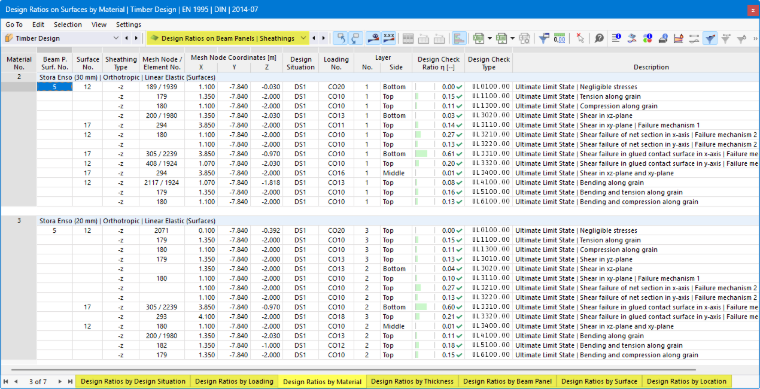
The surface results are sorted in the tabs according to the following criteria:
- Loads (design situations, load combinations)
- Surface properties (materials, thicknesses)
- Objects (beam panels, surfaces, FE mesh points)
Beam Panel Surface No.
Each beam panel is assigned a surface. The number of this surface is specified here.
Surface No.
For each design criterion, the number of the surface with the highest design ratio is specified.
Sheathing Type
The location of the sheathing is described here. The “-z” side refers to the negative surface side (opposite the local z-axis), while the “+z” side refers to the positive surface side (see Beam Panel | Sheathing).
Mesh Node / Element No.
The number of the FE mesh node for which the maximum design ratio was determined is specified. A second number identifies the finite element adjacent to the FE node if there are different design-relevant internal forces at that node.
Mesh Node Coordinates
The three columns show the global coordinates X, Y, and Z of the FE mesh nodes.
Design Situation
This column lists the numbers of the design situations for which the individual design ratios are available.
Loading
The numbers of the load or result combinations that are governing for the respective design checks are specified.
Layer Side
The stresses are analyzed for the following locations of the plating cross-section:
- Top
- Middle
- Bottom
Use the
 button to display the stress distributions in the layers graphically in the Result Diagrams in Surface Point dialog box.
Design Check Ratio
This column lists the design conditions according to the standard. The degree of each design ratio is indicated by the length of the colored bar.
Design Check Type
Each design check is identified by a numerical code. For example, design checks for load capacity according to Eurocode are identified by the code “UL”, while design checks for serviceability are identified by the code “SE”. The type of design is explained in the Description column.
Design Check Formula
You can activate this column in the Result Table Manager. It lists the equations from the standard used to perform the design checks.
Description
Each design check is explained with a brief description referencing the relevant chapter in the standard.
You can display the design check details for a specific design ratio by clicking the
 button or double-clicking the row.
Filtering Results
The chapter Design Ratios on Members describes how to filter the results by limit state and by design ratio.