


In the Time-Dependent Parameters tab of the Material dialog box, you can define the material properties that are relevant for the time-dependent analysis. In addition to user-defined entries for “Concrete” materials, this can also be done according to the standard (EN 1992-1-1).
Settings
In this section, you specify which time-dependent effects should be applied and which definition type should be used. The entries and visualization change depending on your selection. For clarity, the following sections are organized according to the selected definition type.
Definition Type: User-Defined
By selecting the “User-Defined” definition type, you have access to the function types Creep Coefficient φ and Shrinkage Strains εcs, which correspond to the applied time-dependent effects of creep and shrinkage. These can be entered or added in the lower-left corner, or imported from Excel using the
 button and exported using
 .
.
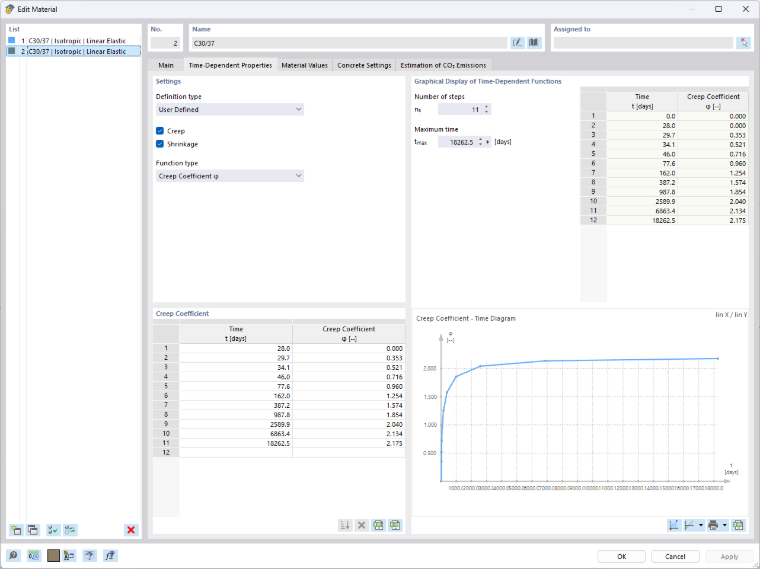
Graphical Display of Time-Dependent Functions
In this section, you can define parameters used for visualizing the time-dependent functions. The function type selected under Settings determines the time-dependent parameters displayed in the table and the diagram. The following settings are available for visualization:
- Number of steps: The value ns affects the graph division.
- Age of concrete at relevant point of time: The value t represents the end point of the x-axis.
Definition Type According to Standard
With the standard-based definition type, the parameters of the time-dependent effects are automatically calculated according to the selected standard. Currently, calculations according to “EN 1992-1-1” are available for concrete. For more information, see the Concrete Design add-on manual.
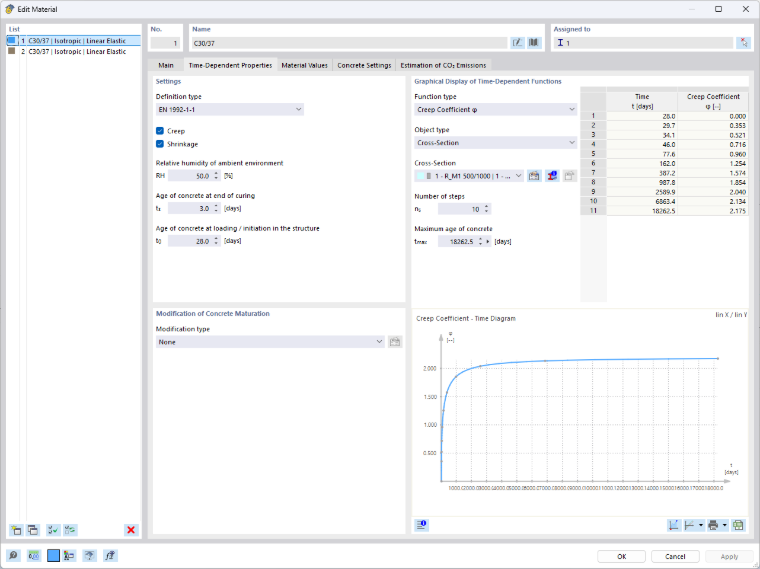
Creep
Select the "Creep" check box to take into account the time-dependent deformation of the material when determining internal forces. You can then specify the parameters used to determine the creep coefficient φ:
- Relative humidity RH
- Age of concrete at loading / initiation in the structure t0
Shrinkage
Select the “Shrinkage” check box if you want the time-dependent shrinkage strain to be considered as a load. You can then specify the parameters the program uses to determine the basic shrinkage value εcd,0 and, based on that, the shrinkage strains εcs, εca, and εcd:
- Relative humidity of the environment RH
- Age of the concrete at end of curing ts
- Age of concrete at loading / initiation in the structure t0
Modification of Concrete Maturation
The following options are available in the list (see the image Defining Time-Dependent Material Properties According to Standard):
- None: The concrete matures according to the standard curve.
- Temperature treatment: Temperature treatment affects the hardening of concrete and thus the effective concrete age under loading. Click the
 button to define the parameters of the temperature treatment in a separate dialog box.
- Measuring the Modulus of Elasticity: Enter the measured modulus of elasticity Ecm(t) and the time of measurement in order to take into account an equivalent concrete age.
- Measuring the Concrete Strength: Enter the measured strength fcm(t) and the time of measurement to take into account an equivalent concrete age.
Graphical Display of Time-Dependent Functions
In this section, you can specify parameters used to visualize the time-dependent behavior:
- Function type: The function type determines the calculated time-dependent parameters displayed in the table and the diagram. The available options are:
- Creep: Creep coefficient φ at the equivalent time
- Shrinkage: Shrinkage strains εcs, εca, and εcd
- Object type: The object type for which the visualization is performed. The following options are available:
- Thickness
- Cross-section
- Number of steps: The value ns affects the division of the graph.
- Age of concrete at the considered time: The value t represents the end point of the abscissa.
The
 button below the diagram opens the "Calculated Time-Dependent Parameters" dialog box. You can read off the creep and shrinkage parameters there.
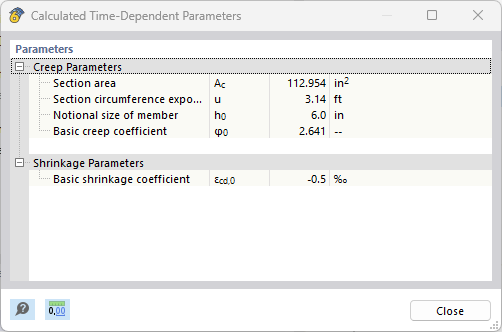
Diagram
In the lower-right section, you'll see the “Function Value – Time” graph. As you move the mouse along the graph, the corresponding x- and y-coordinates appear. You can zoom in and out using the mouse wheel, move the graph by clicking the left mouse button, and restore the full view of the graph by double-clicking the mouse wheel.
The other buttons allow you to adjust the display of the diagram and to print the graphic.
Display: Linear or Logarithmic
A linear (lin) and logarithmic (log) division of the axes is possible for an optimal display. The following options are available using the list button
 :
:
- lin X / lin Y
- log X / lin Y
- lin X / log Y
- log X / log Y
Print Function
It is also possible to print the diagram. Using the list button
 , you have the following options:
- Print Graphics to Printer
- Print Graphics to Printout Report
- Print Graphics to PDF
- Print Graphics to Clipboard
- Print Graphics to File
The graphics printout is described in the chapter Graphics of the RFEM manual.
Export
Use the
button to export the time diagram to Excel.