


Answer:
If you cannot move or delete guidelines or building grids, the “Lock All Guideline Objects” or “Lock All Building Grids” feature may be activated.
To check this setting:
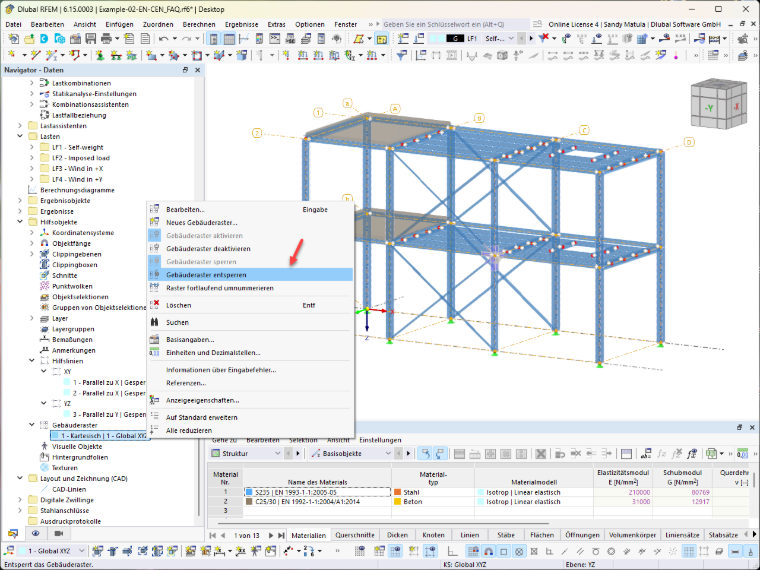
Option 1: Using the Navigator – Data
- In the Navigator – Data, open the “Guideline Objects” entry.
- Select Guidelines or Building Grids.
- Check whether “Lock Guidelines” or “Lock Building Grids” is enabled, and unlock them.
Or
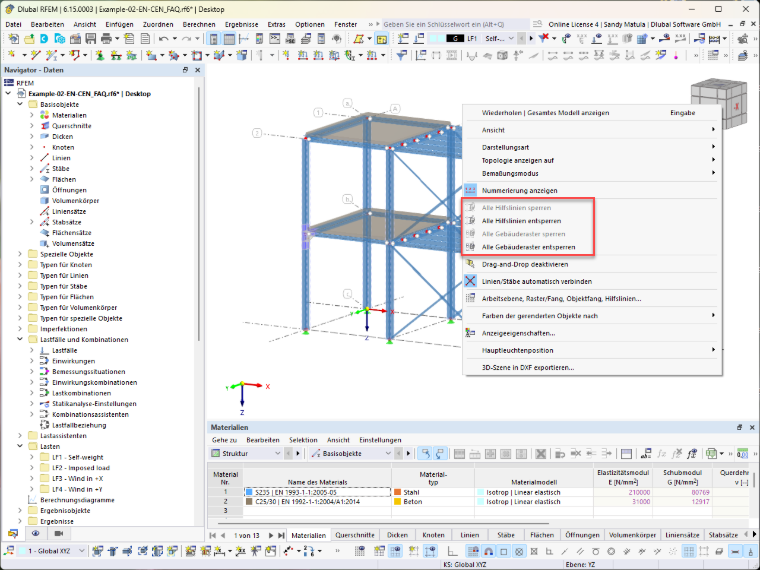
Option 2: Using the shortcut menu
- Right-click in an empty area of the work window.
- In the shortcut menu, check whether “Lock All Guidelines” or “Lock All Building Grids” is enabled.
- If the lock is active, click “Unlock All Guidelines” or “Unlock All Building Grids.”
Afterward, the guidelines or building grids can be shifted or deleted as usual.