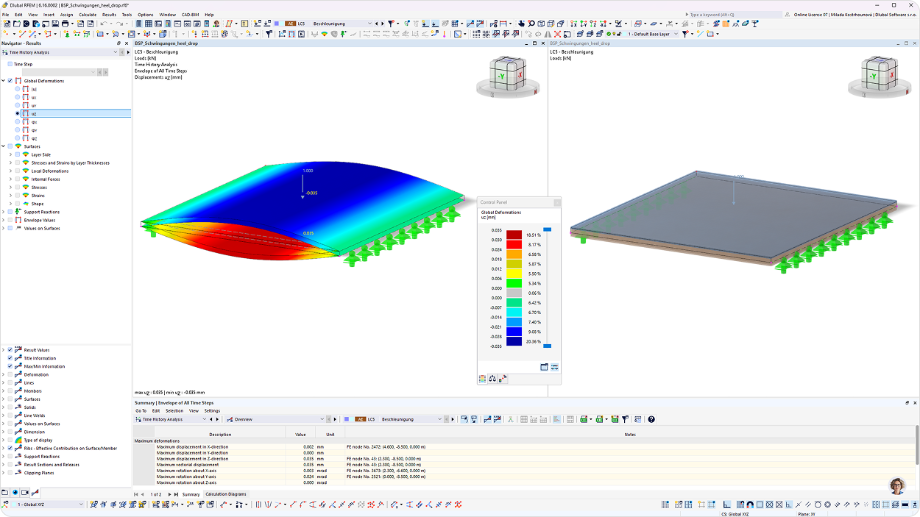
Community
Sign in to your account

Sign up for the Dlubal Extranet to get most of the software and have exclusive access to your personal data.

Create Account
By signing-in you agree to Dlubal Conditions of Use & Sale. Please see our Privacy Notice, our Cookies Notice.
0
Webshop
Contact Sales Team
Language
  • Deutsch
  • English
  • Français
  • Español
  • Português
  • Italiano
  • Česky
  • Polski
  • Pусский
  • 中文(简体)
  • Industries
    • Reinforced Concrete Structures
    • Prestressed Concrete Structures
    • Steel Structures
    • Wood & Mass Timber Structures
    • Masonry Structures
    • Aluminum and Lightweight Structures
    • Buildings
    • Industrial Structures and Plants
    • Pipelines
    • Bridge Structures
    • Cranes and Craneways
    • Towers and Masts
    • Glass Structures
    • Tensile Membrane Structures
    • Cable and Tensile Structures
    • Laminate and Sandwich Structures
    • Temporary Structures
    • Scaffolding and Rack Structures
    • Offshore Structures
    • Silos and Storage Tanks
    • Renewable Energy Plants
    • Solar Structures & Mounting Systems
    • Shipbuilding and Floating Bodies
    • Conveyor Structures
    • Drilling Structures
    • Swimming Pools and Water Parks
    • Container Structures
    • Drilled Pile Foundations
    • Staircase Structures
    • Power Plants
    • Hydraulic Steel Engineering
    • Mechanical Engineering
    • Pneumatic Structures
    Application Areas
    • Structural Engineering
    • Finite Element Analysis (FEA)
    • Wind Simulation and Wind Load Generation
    • Stress Analysis
    • Nonlinear Analysis
    • Stability Analysis
    • Nonlinear Buckling Analysis
    • Warping Torsion Analysis
    • Dynamic and Seismic Analysis
    • Nonlinear Dynamic Analysis
    • Pushover Analysis
    • Form-Finding and Cutting Patterns
    • Steel Joints
    • BIM Planning
    • Cold-Formed Sections
    • Soil-Structure Interaction
    • Facade Analysis
    • Foundations and Foundation Engineering
    • Construction Stages
    • Fire Resistance
    Standards
    • Eurocodes (EC)
    • German Standards (DIN)
    • British Standards (BS EN, BS)
    • Italian Standards (NTC)
    • US Standards
    • Canadian Standards (CSA)
    • Australian Standards (AS)
    • Swiss Standards (SIA)
    • Chinese Standards (GB, HK)
    • Indian Standards (IS)
    • Mexican Standards (RCDF, CFE Sismo 15)
    • Russian Standards (SP)
    • South African Standards (SANS)
    • Brazilian Standards (NBR)
    Online Services
    • Geo-Zone Tool Top Menu Icon Snow Load, Wind Speed, and Seismic Load Maps
    • Cloud Calculation Icon Cloud Calculations
    • Structural Analysis Wiki Icon Structural Analysis Wiki
    • Cross-Section Properties of Steel and Timber Sections Icon Cross-Section Properties of Steel Cross-Sections
    Structural Design for Solar Systems

    Dlubal Software helps you create and verify any solar mounting system. Work efficiently with steel, aluminum, and concrete structures in a single environment.

    Explore Tools
    Solar Structures Solar Structures | Mobile Version
    FEA for Steel Connections

    Design and analyze steel connections using CBFEM, compliant with EN 1993‑1‑8 and AISC 360, fully integrated in RFEM 6 for faster, more accurate structural workflows.

    Learn More
    Steel Connections Steel Connections
  • Icon representing RFEM 6, a finite element analysis software application. RFEM 6 Only Structural Analysis and Design Software You Need for Your Projects

    RFEM 6 serves as the basis of the modular program family and is used to define structures, materials, and actions for plate, wall, shell, and beam structures, as well as for solids and contact elements.

    More Information
    Add-on Switch Icon Add-ons
    • Additional Analyses
    • Dynamic Analysis
    • Special Solutions
    • Design
    • Connections
    RSTAB 9 Icon without borders RSTAB 9 Iconic Frame and Truss Analysis Software

    RSTAB 9 is a powerful analysis and design software for 3D beam, frame, or truss structure calculations, reflecting the current state of the art and helping structural engineers meet requirements in modern civil engineering.

    More Information
    Add-on Switch Icon Add-ons
    • Additional Analysis
    • Dynamic Analysis
    • Special Solutions
    • Design
    RSECTION 1 Icon without borders RSECTION 1 User-Defined Cross-Section Properties

    RSECTION supports structural engineers by determining cross-section properties for a wide variety of cross-sections and allowing for subsequent stress analysis.

    More Information
    RWIND 3 Icon without borders RWIND 3 CFD Software for Digital Wind Tunnels

    RWIND 3 is a digital wind tunnel for simulating wind flows around any building geometry and for the calculation of the wind loads on their surfaces.

    More Information
    Description of a structural analysis and design application icon in vector format, depicting core functionalities of the calculation tool through AI technology. Dlubal CALC The AI Workspace for Structural Engineers

    Ask a code question, design a member to Eurocode, check your RFEM 6 model, or run a special check that no add-on covers. Every answer shows its derivation and source, and stays checkable.

    Discover Dlubal CALC
    Dark blue SVG Icon for AI symbol Features
    • Skills
    • Company Knowledge
    • Connectors
    Dlubal API

    The new Dlubal API service (gRPC) provides you with a flexible interface to the structural analysis software based on Python and C#, with direct access to the entire Dlubal product range.

    Start With API
    Background for the main menu banner API Background for the main menu banner API
    Geo-Zone Tool

    The Dlubal online service provides zone maps for quick determination of snow loads, wind speeds, and seismic data.

    CHECK LOAD ZONES
    Geo-zone tool visual displaying snow, wind, and seismic maps with illustrations for environmental load assessments. Illustration of snow, wind, and seismic geo-zone maps on a mobile version showing various regions and data.
    Outdated Products
  • Support
    • Frequently Asked Questions (FAQ)
    • Knowledge Base
    • Product Features
    • Licensing
    • Ask Individual Question
    • Our Support Team
    • Submit Program Feature or Idea
    • FAQ for Licensing & Authorization 
    • Report Problem or Program Issue
    • Program Updates
    • Program Issues
    • Formulas | Math is fun!
    Training
    • First Steps with RFEM
    • First Steps with RSTAB
    • Online Training
    • Training in Dlubal
    • Individual Training
    • Videos
    • E-Learning Videos
    • Webinars – Learn Online
    • Online Courses
    Service
    • Free Support / Service
    • Geo-Zone Tool for Load Determination
    • Extranet | My Account
    • Project Support
    • Service Contract
    • Updates & Upgrades
    • Previous Program Versions
    Sales
    • Webshop
    • Our Sales Team
    • Contact Our Sales Team
    • Schedule an online product demo
    • Why Dlubal Software
    AI Support Assistant
    • Mia – Your 24/7 AI Assistant
    • Discover Your Personal AI Assistant
    Free Support & Service

    Need help? Access free support options including 24/7 AI assistance, email support, and webinars.

    Learn More
    Free Support & Service Free Support & Service
    Find Answers Fast

    Find quick answers to common questions about Dlubal Software. Search or filter hundreds of FAQ to solve issues in no time.

    View FAQ
    Frequently Asked Questions (FAQ) FAQ | Mobile Version
  • News
    • Current News
    • New Product Features
    • Subscribe to Newsletter
    • New Programs
    • Dlubal Blog
    Training
    • Online Training
    • Individual Training
    Events
    • Event Overview
    • Trade Fairs and Conferences
    • Webinars
    Master Engineering with Webinars

    Join industry leaders and explore solutions in structural engineering and software. Enhance your skills with our live sessions!

    See Next Webinars
    3D FEA Software RFEM 6 | First Steps Menu Banner Image | News Webinars | Mobile Version
    Unlock the Power of Innovation

    Discover cutting-edge tools and enhancements designed to boost your engineering workflow.

    Explore New Features
    Explore New Features Menu Banner Image | News_ProductFeatures | Mobile Version
  • Download Full Version

    Would you like to try out the capabilities of the Dlubal Software programs? You have the opportunity to do so! With the free 90-day full version you can thoroughly test all our programs.

    Start Trial Version Now
    Dlubal Free Zone

    In the Dlubal free zone, you can access webinars, articles, and software trial versions—all free of charge and conveniently located in one place.

    More Information
    Examples
    • Structural Analysis Models to Download
    • Submit Structural Analysis Model
    • Introductory Examples and Tutorials
    • Verification Examples
    • Image Overview
    Documents
    • Online Manuals
    • Manuals
    • Leaflets, Brochures, and Certificates
    References
    • Customer Projects
    • Why Submit Your Customer Project?
    • How to Submit Customer Project?
    • Submit Customer Project
    Free Models to Download

    Explore thousands of ready-to-use structural models. Download, adapt, and use them as templates to accelerate your design process.

    Discover Models
    Structural Analysis Models to Download Free Models to Download | Mobile Version
    Dlubal Free Zone

    Get expert help whenever you need it. Enjoy free AI assistance, email support, live webinars, and premium services for Service Contract Pro users.

    Get Support
    Free Support & Service Free Support & Service | Mobile Version
  • E-Learning
    • RFEM 6 for Beginners
    • RFEM 6 for Students
    • Programming with RFEM 6 and Python
    • RFEM 6 with Rhino & Grasshopper
    • RFEM 5 for Beginners
    • Modeling with RFEM 5
    • Structural Analysis Learning Videos for Students
    • Quick Tutorials for Dlubal Programs
    • Best Tips and Tricks in RFEM
    • Dlubal Online Training Recordings
    • Recorded Dlubal Webinars
    Students and Schools
    • Free Structural Analysis Software for Students
    • Request or Renew Free Student License
    • Request for Free Instructor License
    • Submit Thesis
    • Why Submit Your Thesis?
    • Graduation Theses with Dlubal Structural Analysis Software
    • Free Structural Analysis Software for Educational Institutions
    • Request School Package
    • Free Introductory Training at Your University
    • Request Training Date
    Knowledge Platform
    • First Steps with RFEM
    • Videos
    • Online Manuals
    • Structural Analysis Wiki
    • Knowledge Base
    • Frequently Asked Questions (FAQ)
    Infotainment
    • Podcast
    • Dlubal Blog
    • Introduction to Structural Analysis and Design
    First Steps with RFEM 6

    Take your first steps with RFEM 6 and discover how quickly you can model and calculate. Customize with add-ons for even more possibilities.

    Get Started
    3D FEA Software RFEM 6 | First Steps Menu Banner Image | News Webinars | Mobile Version
    Free Structural Analysis Software for Students

    Thousands of students worldwide already benefit from Dlubal Software. Enjoy free access, training, and expert support throughout your studies.

    Get Free License
    Free Structural Analysis Software for Students Free Structural Analysis Software for Students
  • About Us
    • History and Facts
    • Company Philosophy
    • Why Dlubal Software?
    • Product Comparison
    • Quality Policy
    • Our Team
    Contact
    • Dlubal Locations Worldwide
    • Authorized Dlubal Resellers
    References
    • Customer Reviews
    • Case Studies
    • Customer Projects
    • Why submit your customer project?
    • Verification Examples
    • Your Review
    • Participation in Research Projects
    Our Customers

    We present our customers who realize their projects with Dlubal Software. Learn how our customers worldwide implement innovative solutions in construction and engineering using advanced tools for structural analysis and dynamic analysis.

    View Our Customers
    Building Success Together

    Discover how leading engineers around the world trust our solutions to elevate their projects with us.

    See Our Customers
    See Our Customers Menu Banner Image | Company_OurCustomers_Mobile
    Meet the Experts

    Our dedicated engineers are here to assist you with modeling, design, and technical challenges—anytime, anywhere.

    Connect with Support
    Our Team Menu Banner Image | Company_OurTeam | Mobile Version
  • Career
    • Teams
    • Jobs
    • Colleague Blog
    • Insights
    Jobs
    • All Open Positions
    • Product Development
    • Customer Support
    • Sales
    • Marketing
    • Software Development
    • Administration
    • Interns
    • Others
    Teams
    • Product Development
    • Customer Service
    • Sales
    • Marketing
    • Software Development
    • Administration
    Why Dlubal?
    • Company Culture
    • Employee Benefits
    Build Your Future with Us

    Reveal how our team shapes the future of engineering. Experience innovation, growth, and exciting challenges.

    Your Career Opportunities
    Career at Dlubal Menu Banner Image | Career at Dlubal Mobile
    Find Your Dream Job

    Join a global leader in engineering software and take your career to new heights.

    Explore Open Positions
    All Open Positions Menu Banner Image | Open Positions Mobile
  • Webshop
Main Products
Icon representing RFEM 6, a finite element analysis software application.
RFEM 6
RSTAB 9 Icon without borders
RSTAB 9
RWIND 3 Icon without borders
RWIND 3
RSECTION 1 Icon without borders
RSECTION
Online Services
Geo-Zone Tool icon
Geo-Zone Tool
Cross-section Properties
Cross-Section Properties
API Icon
API
Cloud Calculation Icon
Cloud Calculation
Downloadable Models
Downloadable Models
Dlubal Community Icon
Dlubal Community
Knowledge Base Articles Icon
Knowledge Base
Online Webinars
Webinars
Sign in to your account

Sign up for the Dlubal Extranet to get most of the software and have exclusive access to your personal data.

Login Create Account
90-Day Free Trial
Sign in to your account

Sign up for the Dlubal Extranet to get most of the software and have exclusive access to your personal data.

Login Create Account
  • Products
  • Finite Element Analysis (FEA)
  • Add-ons for RFEM 6
  • Dynamic Analysis
  • Time History Analysis for RFEM 6
RFEM 6 icon in 32px size used for header banners, symbolizing the software's branding. Add-on for RFEM 6
Online Manuals
  • Online Manual | Time History Analysis
  • Tutorial for RFEM 6
  • RFEM 6/RSTAB 9 | First Steps
Show Pricing

Time History Analysis

Simulate any load over time using the accelerogram and time diagram analyses, solved with linear or nonlinear methods. Define time diagrams via function or in a table.

A prominent green download icon set against a dark backdrop provides a visual cue for initiating downloads. Download 90-Day Free Trial Contact Our Sales Team
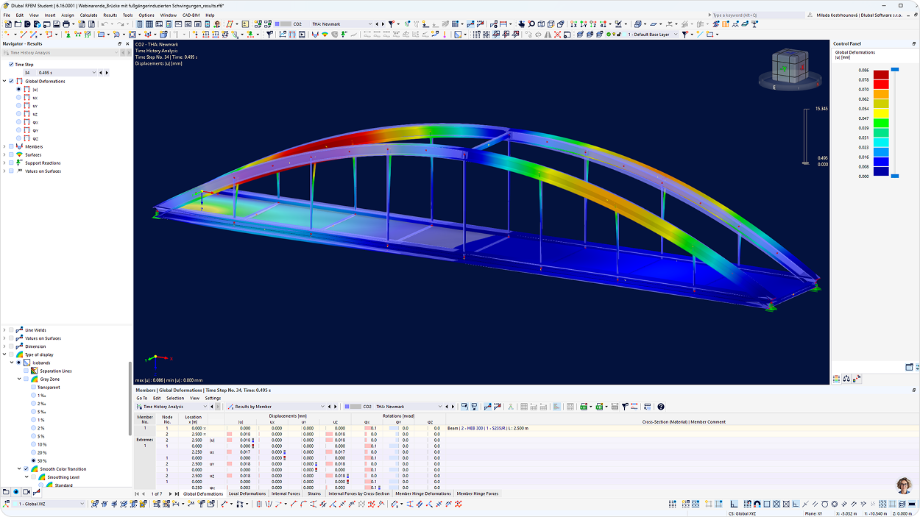
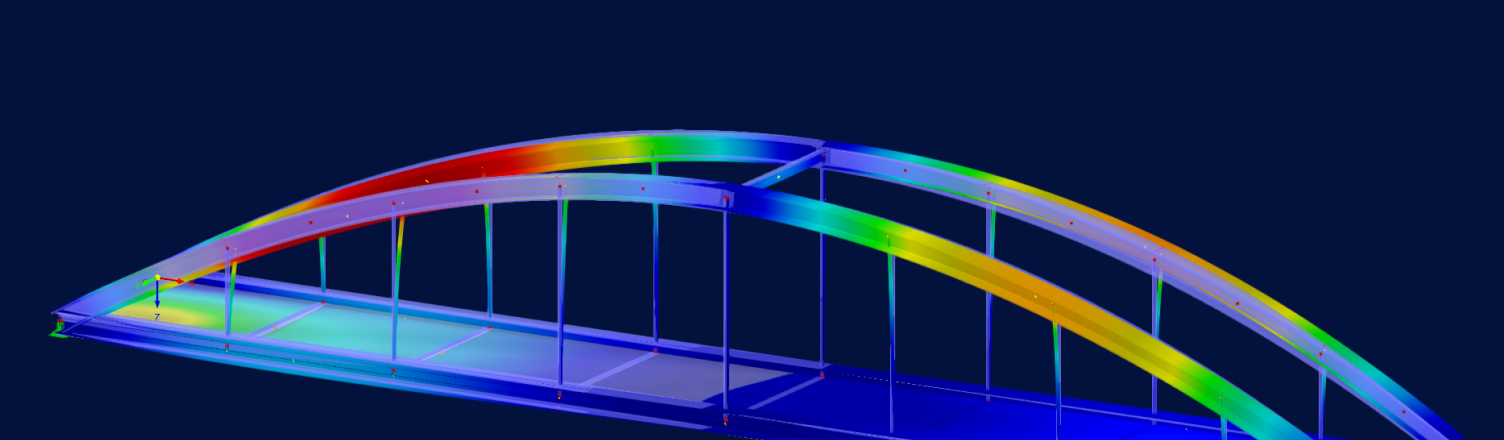
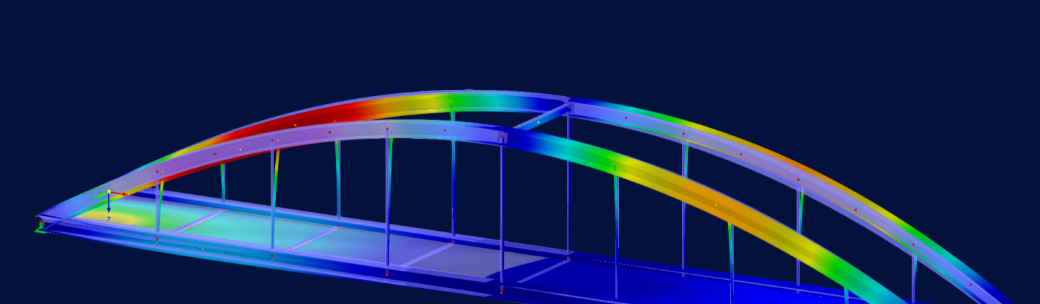
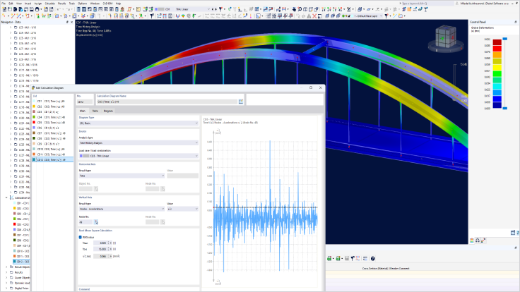
Steel Arch Bridge in RFEM 6 with Color-Coded Displacements from Time History Analysis Steel Arch Bridge in RFEM 6 with Color-Coded Displacements from Time History Analysis
  • Overview
  • Use Cases
  • Product Features
  • Articles
  • FAQ

Discover Time History Analysis
for RFEM 6

Choose either the accelerogram or the time diagram, select a linear or nonlinear solution method and define the time step, mass matrix, and damping. The outcome is a time series for each result.

Results are available for global deformations, members, areas, and support reactions. Typical applications include earthquakes, machine-induced vibrations, blast analysis, and moving loads. The analysis is standard-independent.

  • Accelerograms and time diagrams with a library of seismic events
  • Linear modal, linear implicit Newmark, and nonlinear implicit Newmark methods
  • Combination of several independent excitation functions
  • Rayleigh damping or Lehr's damping value
  • Calculation diagrams for any result
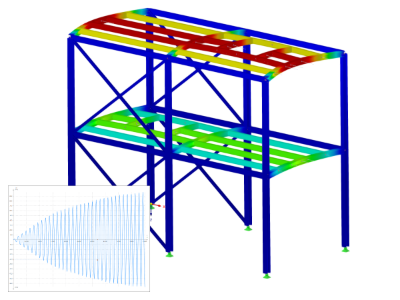
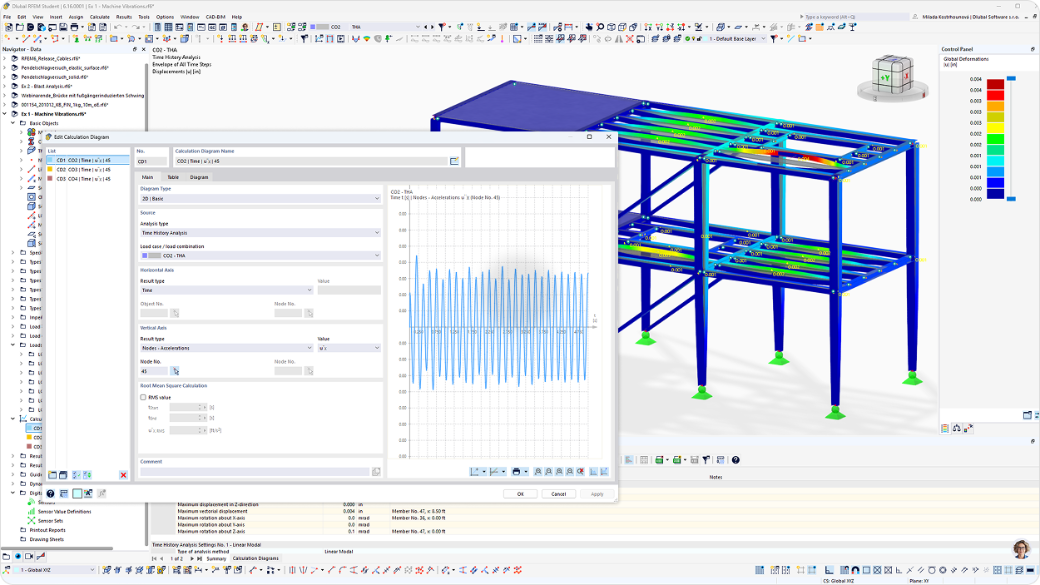
RFEM 6 Calculation Diagram Dialog for Time History Analysis next to Two-Story Steel Frame Model with Deformation Results

Your Advantages

Four reasons why engineers integrate Time History Analysis into their RFEM 6 workflow.

Time Series for Every Result

Evaluate global deformations, members, areas, and support reactions step by step, and group related results in calculation diagrams for your printout report.

Seismic Library and Own Records

Use accelerograms from the extensive library of seismic events, or define your own records via Excel import or by manually entering time and acceleration values.

Linear and Nonlinear Solvers

Select the linear modal, linear implicit Newmark, or nonlinear implicit Newmark solver, and account for nonlinearities, such as changing stiffness, where they matter for your structure.

Two Analysis Types, One Add-on

Select an accelerogram to analyze base excitation or a time diagram to analyze general loads over time, defined by a function or in a table, to cover the full range of dynamic applications.

Use Cases

The Time History Analysis add-on allows you to simulate a wide range of applications that require time-domain analysis, taking advantage of its integration with other add-ons, features, and graphical capabilities of RFEM 6. Some relevant use cases include:

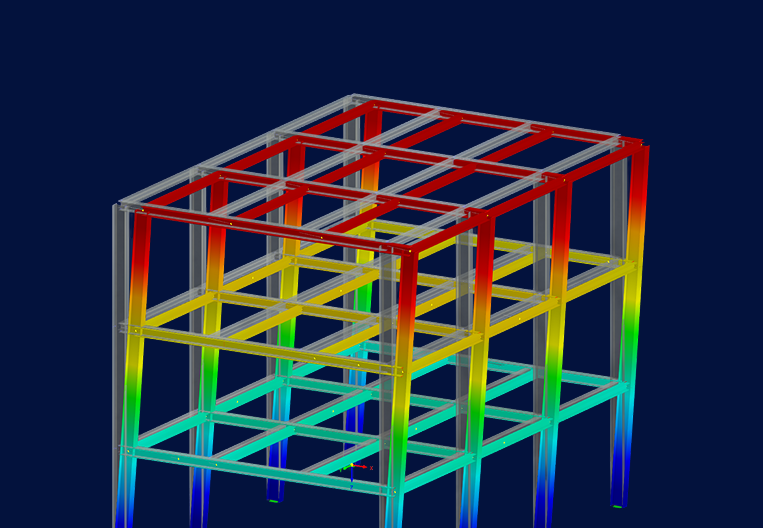
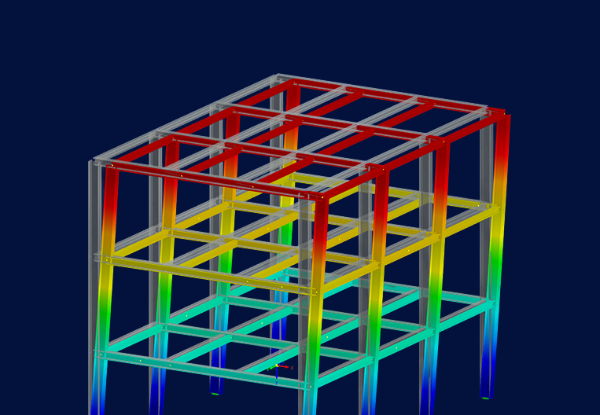
Three-Story Steel Frame in RFEM 6 with Color-Coded Vibration Displacements from Time History Analysis Three-Story Steel Frame in RFEM 6 with Color-Coded Vibration Displacements from Time History Analysis
Accelerograms for Seismic Analysis

Simulate the base excitation problem for any structure. Define your own earthquake recording or use one from our library for seismic events.

Blast Analysis

Use the Time Diagram analysis to define pressure-time steps that simulate shock wave propagation. Solve with the system's modal properties or the Linear Implicit Newmark method.

Machine-Induced Vibrations

Describe machine-induced vibrations using a time function. Then, select a nonlinear method to consider nonlinearities and assess the results using calculation diagrams.

Moving Loads

Use the Moving Load Wizard to create loads and integrate them into a Time History Analysis load combination. This will assign each load a spatial location and chronological order.

Product Features

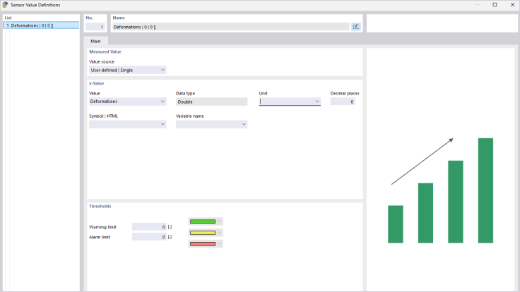
Sensor Value Definitions Dialog in RFEM 6 for Digital Twin Measurement Data

Digital Twins in Analysis

Use the standard RFEM feature to store sensors and their measurement data in the model and perform limit comparisons in the time history analysis.

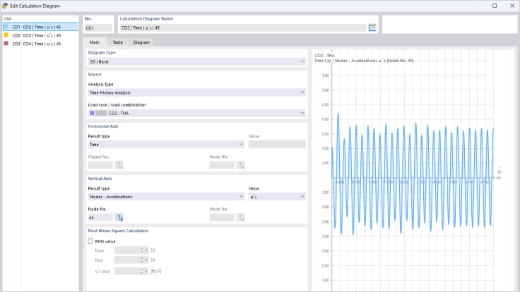
Edit Calculation Diagram dialog in RFEM 6 Showing Time Series of Nodal Accelerations

Time Series Calculation Diagrams

Generate a time series for any result, then save the graph or send it to the printout report. The 2D Group graphs combine related results on a single graph, making it easy to compare them.

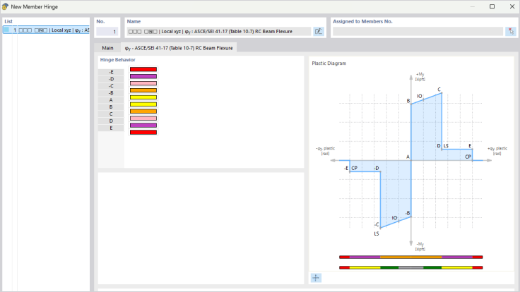
New Member Hinge Dialog in RFEM 6 with Plastic Diagram According to ASCE/SEI 41-17 Table 10-7

Plastic Hinges (ASCE/SEI 41-17)

According to Table 10-7 of ASCE/SEI 41-17, plastic hinges consider longitudinal and transverse reinforcement and shear force. This requires the Concrete Design add-on and either Pushover Analysis or Time History Analysis.

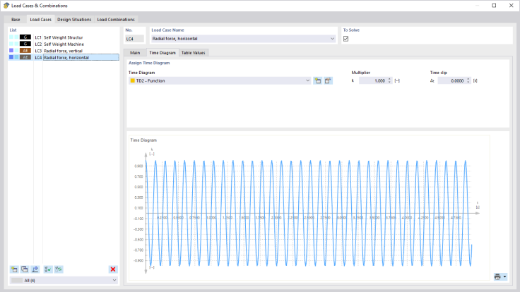
Load Cases and Combinations dialog in RFEM 6 with Periodic Time Diagram Assigned to Load Case

Time Diagram Analysis Type

Define a multiplier function for the loads, or enter multiplication factors in a table step by step. Use time diagrams for load cases or combinations, which are ideal for blast analysis and moving loads.

Calculation Diagram of Nodal Accelerations with RMS Evaluation Over Bridge Model in RFEM 6

Accelerogram Analysis Type

Create a model of base excitation using an accelerogram from the RFEM library, an imported Excel record, or manually entered data. Then, scale each of the three components and rotate the axes, if needed.

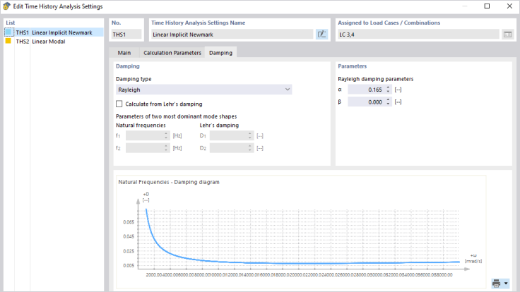
Time History Analysis Settings Dialog in RFEM 6 with Rayleigh Damping Parameters

Linear and Nonlinear Methods

Select from the Linear Modal, Linear Implicit Newmark, or Nonlinear Implicit Newmark. Nonlinear methods account for nonlinearities. The mass matrix and time step definitions are the same for all methods.

Show All Features

Designed with Time History Analysis

Single-Axis Solar Tracker with Damped Ends

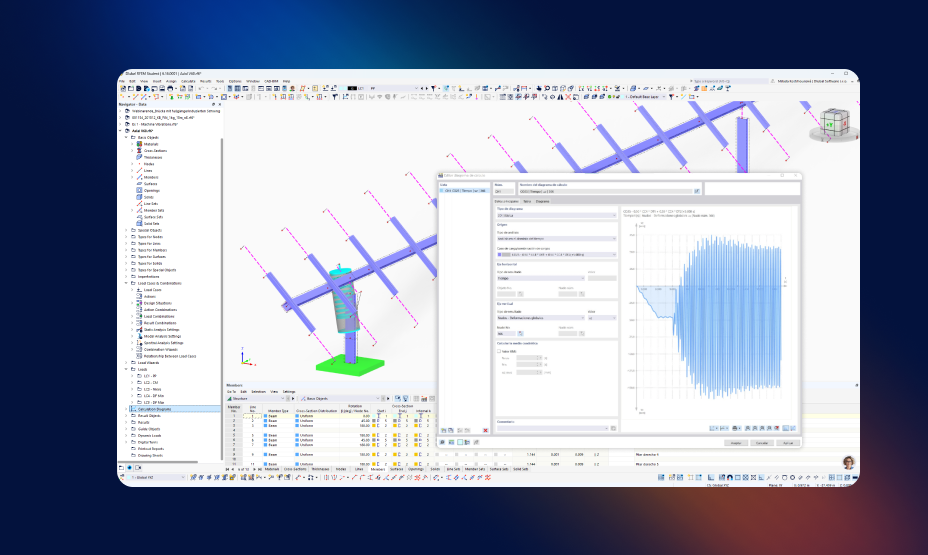
The viscous dampers on the outer columns stiffen the tracker and limit torsional deformations caused by wind gusts. Time history analyses were used to assess aeroelastic sensitivity and fatigue. Engineering office: Axial Structural Solutions.

View Customer Project
Single-Axis Solar Tracker Modeled in RFEM 6 with Calculation Diagram of Time History Analysis Single-Axis Solar Tracker Modeled in RFEM 6 with Calculation Diagram of Time History Analysis
What do our users say?

RFEM saves me a lot of time and effort. I calculate crack widths and reinforcement in the same environment, instead of jumping between different tools.

Hassan Syed
Hassan Syed nts Ingenieurgesellschaft mbH

Data and results stay visible and editable, which minimizes the "black box" effect. This confirmed our decision in favor of RFEM.

The portrait shows Mr. Philippe Piron of Global Design Technology, a customer of Dlubal Software, Customer Review 257.
Philippe Piron Global Design Technology

The design templates are clear and give precise details of the design check criteria and the corresponding standard references.

Cédric Dubois Skyray

Input data and results are shown in a transparent and editable way, and the report generation is highly customizable to client requirements.

Sebastien Cresiel, Norma BET
Sébastien Cresiel Norma BET

RFEM is by far our favorite analysis software. We are impressed by the work Dlubal puts into developing it and responding to issues.

Tim Harris, Ph.D, P.Eng Kassian Dyck and Associates

Related Technical Articles

Cross-Laminated Timber Floor Slab in RFEM 6 with Area Loads and Dimensions for Vibration Analysis

Vibrations on Cross-Laminated Timber Floors per prEN 1995-1-1

A practical vibration analysis of cross-laminated timber floors in RFEM 6 according to prEN 1995-1-1:2023, including key inputs and evaluations.

Steel Arch Bridge in RFEM 6 Showing Global Deformation Results of Time History Analysis at One Time Step

Overview of Seismic Analysis Methods in Earthquake Engineering

Explains the theoretical background of seismic analysis methods, their complexity, accuracy, and computational demands, and when to use each.

More Articles
Try Dlubal software free for 90 days!

Unlock the full potential of Dlubal software with powerful programs like RFEM, RSTAB, RWIND, and RSECTION. Try them for free and see how easy it is to model, analyze, and document even complex structures. Our experts are ready to guide you through a short online demo tailored to your industry.

A prominent green download icon set against a dark backdrop provides a visual cue for initiating downloads. Download 90-Day Free Trial Salesman Icon | Trial Banner Book Consultation

Frequently Asked Questions

How is the mass matrix defined?

There are two options. If you select the Linear Modal method, the mass matrix definition is taken from the modal analysis. For all other methods, select a load case or combination and define the mass matrix settings in the Time History Analysis settings.

How is the damping model be defined?

It depends on the selected analysis method. Only linear methods allow you to select between Lehr's damping (constant) and Rayleigh damping. All other methods use the Rayleigh model.

What types of analyses can I perform with the Time History Analysis add-on?

You can perform two analysis types:

  • Accelerogram: Model the base-excitation response for any structure, using your own earthquake record or one from the seismic event library.
  • Time Diagram: Describe a load over time using either a function or tabular values.
What types of dynamic problems can this add-on solve?

The add-on lets you simulate a wide variety of analyses directly within your RFEM 6 model:

  • Earthquake analysis (accelerograms): Simulate base-excitation problems using your own earthquake recordings or events from the library.
  • Blast analysis: Use time functions to represent shock wave propagation.
  • Machine-induced vibrations: Define time-dependent excitation functions to represent machine effects.
  • Moving loads: Create moving load scenarios and integrate them into time-dependent load combinations.
What is the main difference between the linear and the nonlinear time history analysis?

The main difference is how nonlinearities are considered. In linear analysis, the stiffness matrix remains constant. In a nonlinear analysis, the stiffness matrix is recalculated at each step to evaluate whether a condition that activates a nonlinearity is satisfied.

  • Linear methods: Linear modal and linear implicit Newmark (RFEM and RSTAB)
  • Nonlinear methods: Nonlinear implicit Newmark in RFEM and nonlinear explicit (geometrically linear and large deformation) in RSTAB
Dlubal Community Icon
Join Dlubal Community

Here, you can ask and answer technical questions, engage in meaningful discussions about structural analysis and design, suggest new features, and connect with the Dlubal team and other users directly.

Dark blue icon representing free support service, typically used for websites. It symbolizes assistance and customer service availability.
Contact Our Sales Team

Are you ready to take the next step with your Dlubal purchase? Use this form to tell us which products interest you. Our sales team will provide you with a customized, no-obligation quote.

Webshop

Customize your individual program package and find out all the prices online!

  • RFEM 6 Family
  • RSTAB 9 Family
Go to Webshop

Calculate Your Price

1,620.00 USD
+110.00 USD
Time History Analysis for RFEM 6 / RSTAB 9
Total Amount 1,730.00 USD
API Documentation
Online Manual

Browse the online manual chapter on Dynamic Analysis for background on every setting and result.

SVG icon representing a webinar in dark blue color with stylized elements and typography.
Webinars

Watch recorded expert webinars on time history analysis, including blast analysis in RFEM 6.

Dark blue play icon represented as an SVG graphic. Suitable for multimedia interfaces or interactive design elements.
Videos

Watch video tutorials on Time History Analysis in RFEM 6, from accelerograms to nonlinear analysis.

Structural Analysis and Design Software
Dlubal Software, Inc.

30 South 15th Street, 15th Floor
PA 19103 Philadelphia
United States

+1 (267) 702-2815 [email protected]
Dlubal Software GmbH

Am Zellweg 2
93464 Tiefenbach
Germany

+49 9673 9203-0 [email protected]
Solutions
  • Reinforced Concrete Structures
  • Steel Structures
  • Wood & Mass Timber Structures
  • Steel Joints
Products
  • RFEM 6
  • RSTAB 9
  • RSECTION 1
  • RWIND 3
Support
  • Frequently Asked Questions (FAQ)
  • Ask Individual Question
  • Snow Load, Wind Speed, and Seismic Load Maps
  • Contact Our Sales Team
News
  • Subscribe to Newsletter
  • Current News
  • Event Overview
  • Online Training
Resources
  • Free Full Trial Version
  • Submit Customer Project
  • Customer Projects
  • Online Manuals
Join Dlubal
Dlubal Community YouTube Facebook LinkedIn Twitter Instagram Pinterest TikTok
© 2001-2026 Dlubal Software GmbH | All Rights Reserved
Legal Notice
About Us
Sitemap
Language
  • Deutsch
  • English
  • Français
  • Español
  • Português
  • Italiano
  • Česky
  • Polski
  • Pусский
  • 中文(简体)