Risposta:
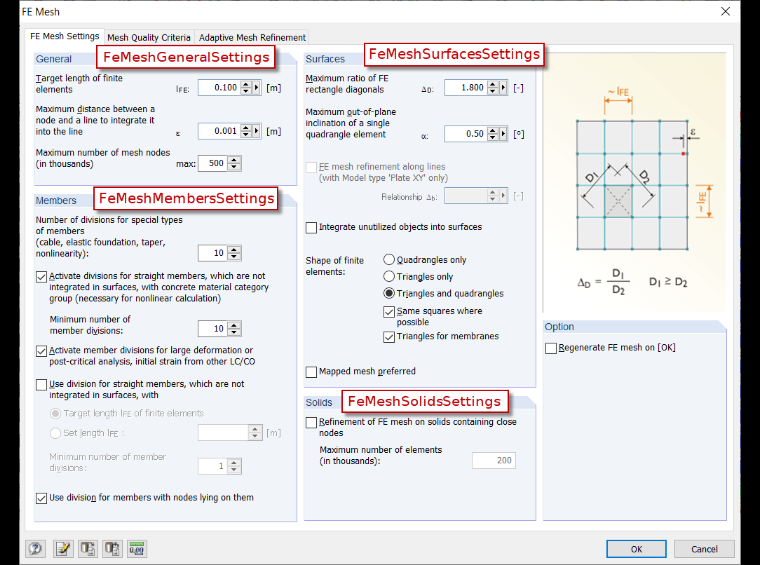
Le impostazioni generali della mesh EF possono essere modificate utilizzando l'interfaccia IFeMeshSettings. Questa interfaccia si trova sotto IModel > IModelData > ICalculation. La Figura 01 mostra quali elementi possono essere modificati / visualizzati.
- Ecco un esempio di codice in cui la lunghezza obiettivo degli elementi EF è impostata su 100 mm. Inoltre, viene attivata la divisione delle aste con la stessa grandezza di elemento ed la divisione minima è impostata su 3 elementi:
Sub mesh_params()

Dim iApp As RFEM5.Application

'   get interface for model data
Dim iModel As RFEM5.model
Set iModel = GetObject(, "RFEM5.Model")

On Error GoTo e

If Not iModel Is Nothing Then

    '   get interface for application and lock licence
    Set iApp = iModel.GetApplication()
    iApp.LockLicense

    '   get interface for model dat
    Dim iModdata As RFEM5.IModelData2
    Set iModdata = iModel.GetModelData

    '   get interface for calculation
    Dim iCalc As RFEM5.ICalculation2
    Set iCalc = iModel.GetCalculation()

    '   get interface for mesh settings
    Dim iMeshSet As RFEM5.IFeMeshSettings
    Set iMeshSet = iCalc.GetFeMeshSettings

    '   get general mesh settings
    Dim meshGen As RFEM5.FeMeshGeneralSettings
    meshGen = iMeshSet.GetGeneral

    meshGen.ElementLength = 0.1

    '   set new general mesh settings
    iModdata.PrepareModification
    iMeshSet.SetGeneral meshGen
    iModdata.FinishModification

    '   get mesh member settings
    Dim meshMem As RFEM5.FeMeshMembersSettings
    meshMem = iMeshSet.GetMembers

    meshMem.DivideStraightMembers = True
    meshMem.ElementLength = 0.1
    meshMem.MinStraightMemberDivisions = 3

    '   set new mesh member settings
    iModdata.PrepareModification
    iMeshSet.SetMembers meshMem
    iModdata.FinishModification


    iApp.UnlockLicense
End If

e:  If Err.Number <> 0 Then
    MsgBox Err.description, , Err.Source
    End If
    iApp.UnlockLicense
    Set iApp = Nothing
    Set iModel = Nothing

End Sub
La subroutine è completata anche da una routine di intercettazione di errore (On Error GoTo e) ed è necessario il blocco Prepare-/FinishModification come nel caso della modifica di altri elementi. Qui, il blocco viene creato tramite l'interfaccia IFeMeshSettings.